
ROLE
Product Designer
TYPE
Web Application
FOCUS
Social Impact
PLATFORM
Web
01
THE CHALLENGE
In working with a workforce non-profit, whose mission is to help older adults return to the workforce, one of the biggest barriers wasn't finding jobs. It was uncertainty.
Many clients relied on public benefits (like SNAP or SSI) to make ends meet and worried that participating in job training or accepting employment would reduce their benefits so much they'd be worse off financially (creating what's known as a benefit cliff). Meanwhile, staff relied on manual calculations and policy guidance to answer complex "what if" questions, making employment planning time-consuming and difficult to scale.
My goal was to create an AI-assisted decision support tool that empowered older adults to confidently explore employment opportunities, while giving staff the tools to model benefit changes and support informed career decisions.
Many clients relied on public benefits (like SNAP or SSI) to make ends meet and worried that participating in job training or accepting employment would reduce their benefits so much they'd be worse off financially (creating what's known as a benefit cliff). Meanwhile, staff relied on manual calculations and policy guidance to answer complex "what if" questions, making employment planning time-consuming and difficult to scale.
My goal was to create an AI-assisted decision support tool that empowered older adults to confidently explore employment opportunities, while giving staff the tools to model benefit changes and support informed career decisions.
1 in 3
employers report that workers have declined jobs, raises, or additional hours because they feared losing public benefits.
$700
more in annual income, can reduce a SNAP benefits by $2,900 for a family of four.
50+
This tool would be designed specifically for older adults navigating employment and public benefits.
02
MY ROLE
I led product design from concept through prototype, partnering with leadership, engineers, and policy experts to transform complex eligibility rules into an intuitive decision-support experience.
Product Strategy
–Defined MVP scope
–Prioritized roadmap features
–Wrote product requirements
Research
–User interviews
–Usability testing
–Policy & eligibility research
Design & Prototyping
–Wireframes & interactive prototypes
–End-to-end user flows
–Developer handoff
Systems Thinking
–Eligibility logic
–Scenario modeling
–Engineering collaboration
03
FEATURED COMPONENTS
A behind-the-scenes look at how I translated a complex policy problem into a decision-support tool.
Understanding the Problem
User Research
Discovery
Systems Thinking
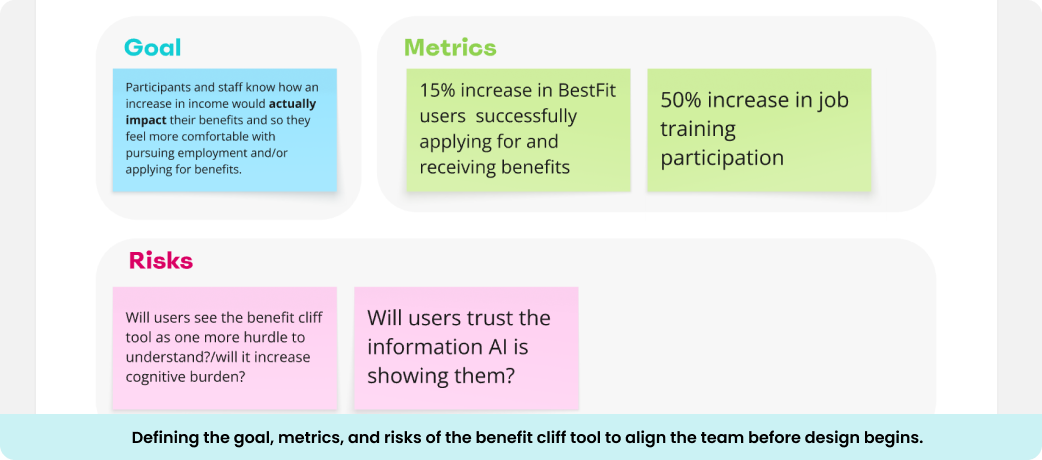
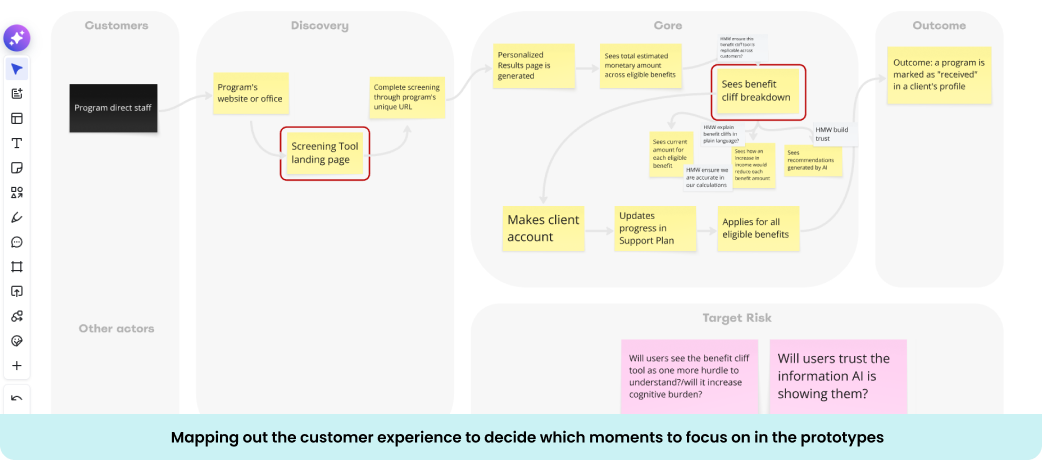
To better define the problem, I facilitated a design sprint to identify goals, risks, and success metrics for this benefit cliff tool. I also explored opportunities for AI to simplify complex policy information and make benefit tradeoffs easier to understand.
The sprint helped shift my thinking from building another benefits calculator to designing a decision support tool that could increase confidence in job training, encourage informed employment decisions, and help the customer fulfill its mission of moving more older adults into sustainable careers.
The sprint helped shift my thinking from building another benefits calculator to designing a decision support tool that could increase confidence in job training, encourage informed employment decisions, and help the customer fulfill its mission of moving more older adults into sustainable careers.
Translating Policy into Product Logic
Product Strategy
Policy research
Systems Design
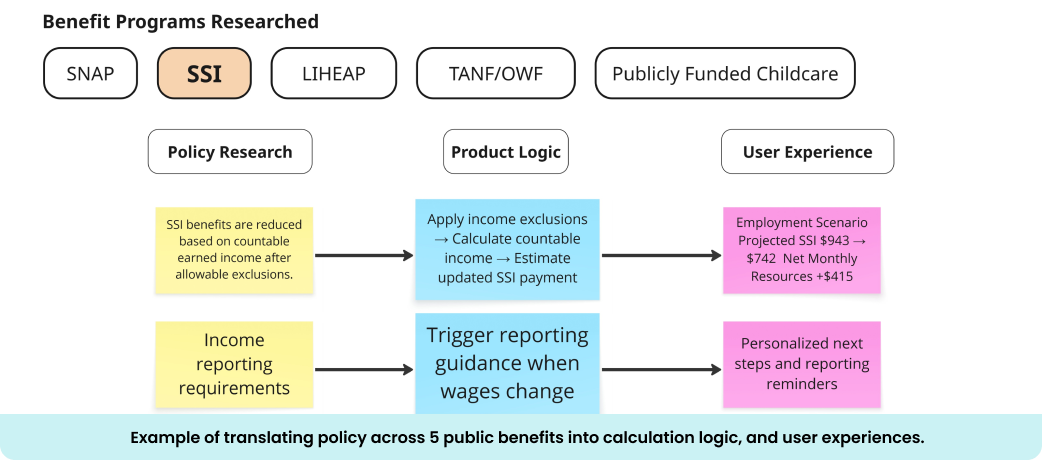
The biggest design challenge wasn't the interface—it was transforming complicated eligibility policies into something software could understand.
I identified which benefit programs mattered most to the customer's clients, defined the data needed to generate accurate comparisons, and mapped how changes in wages could affect benefits over time. Once the calculations were established, I helped define how AI could sit on top of those calculations to explain benefit changes, summarize financial tradeoffs, and generate personalized recommendations without replacing the underlying policy logic.
This approach ensured recommendations remained accurate, transparent, and grounded in trusted eligibility rules.
I identified which benefit programs mattered most to the customer's clients, defined the data needed to generate accurate comparisons, and mapped how changes in wages could affect benefits over time. Once the calculations were established, I helped define how AI could sit on top of those calculations to explain benefit changes, summarize financial tradeoffs, and generate personalized recommendations without replacing the underlying policy logic.
This approach ensured recommendations remained accurate, transparent, and grounded in trusted eligibility rules.
Designing the Decision Experience
UX Design
Information Architecture
Data Visualization
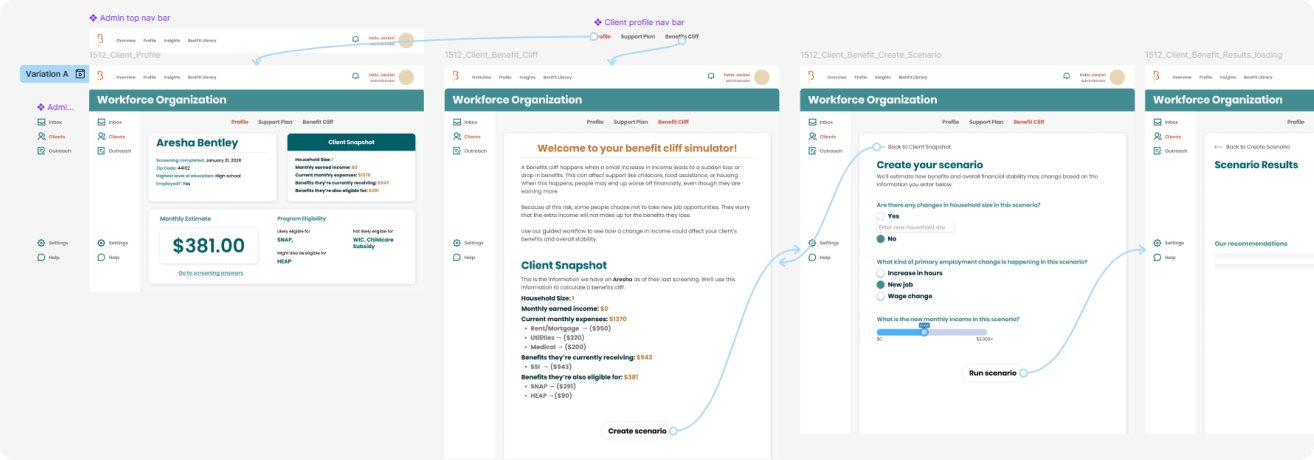
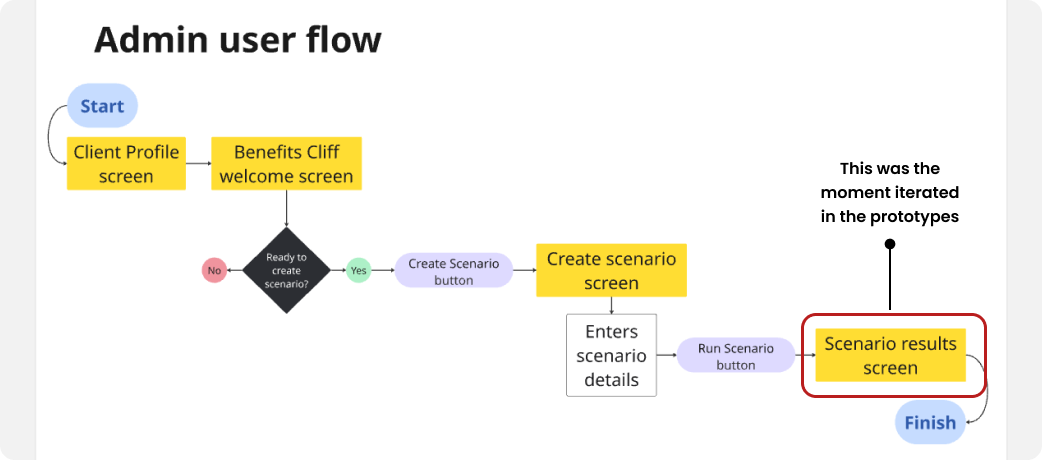
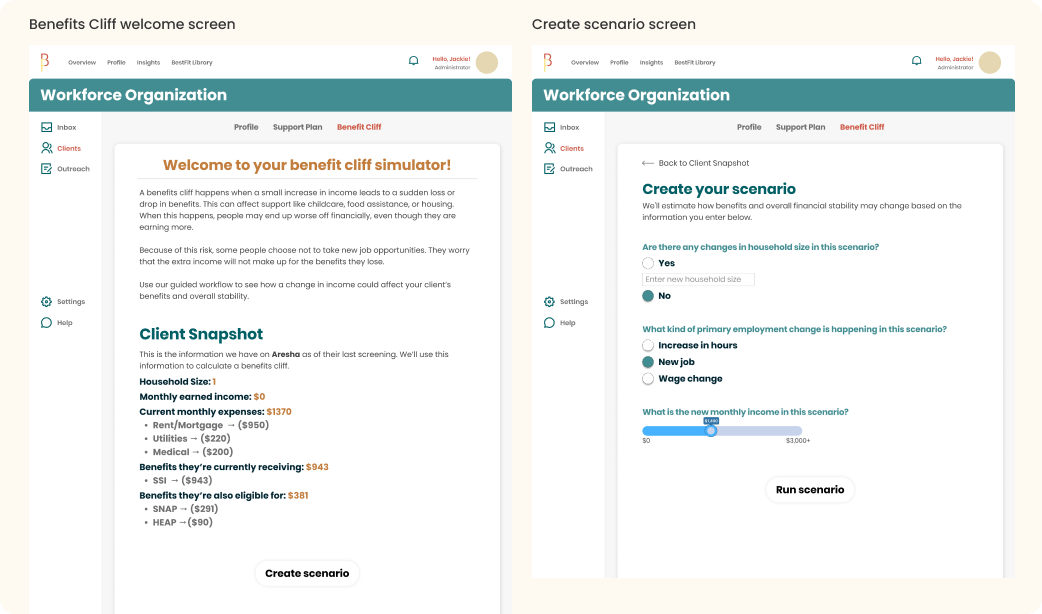
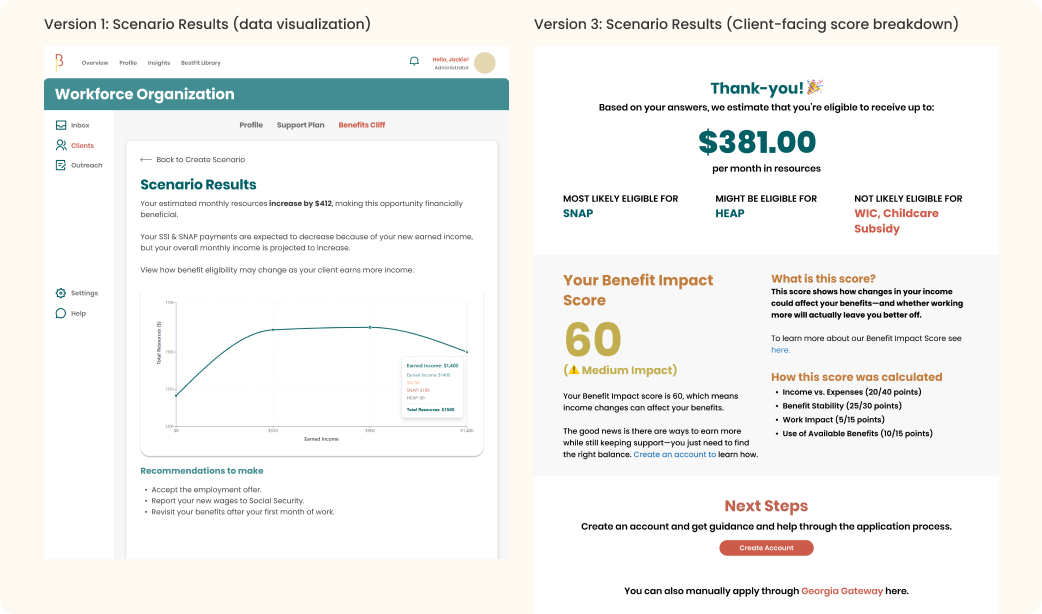
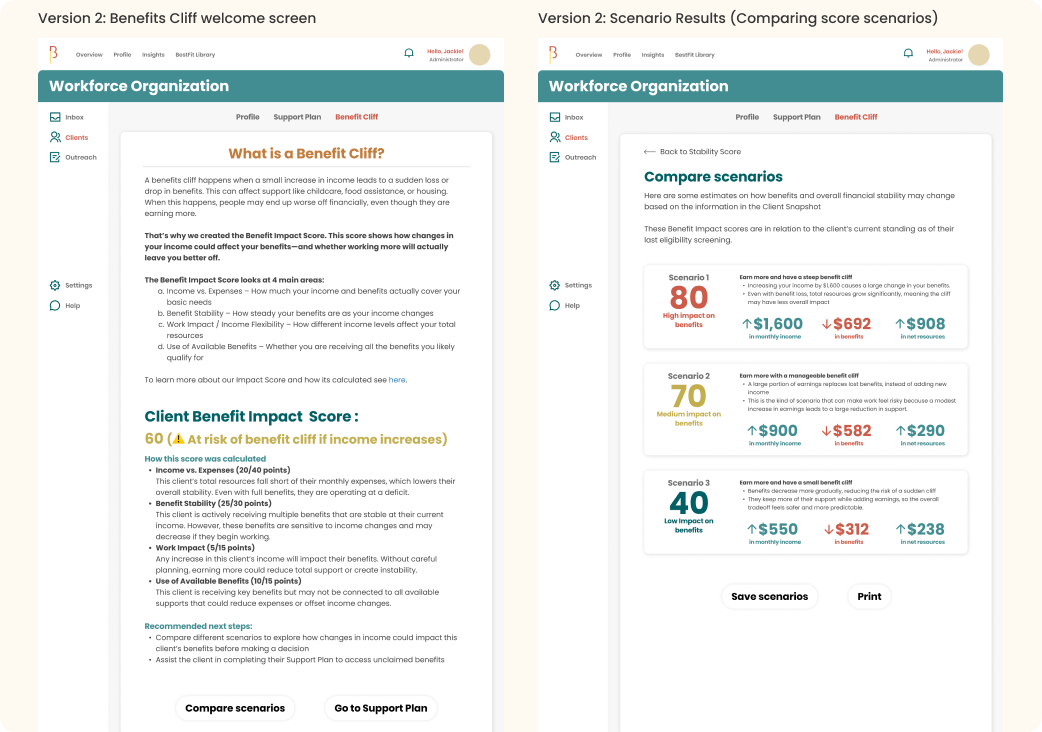
Rather than committing to a single solution, I designed three distinct concepts, each testing a different way to communicate benefit changes, financial impact, and personalized guidance. To evaluate the concepts quickly, I built interactive prototypes in FigMake, allowing stakeholders and users to experience realistic workflows before development.
Version 1: Interactive Scenario Chart and Recommendations (Admin-facing)
Version 1: Interactive Scenario Chart and Recommendations (Admin-facing)
- Tested using an interactive data visualization to help case managers explain the projected income's impact on benefits over time, along with AI-generated personalized recommendations.
- Tested using a scoring model to help case managers assess the financial impact of employment changes.
- Tested placing directly into the client journey, allowing users to explore employment scenarios independently.
Validating with Staff & Clients
User Feedback
Usability Testing
Iteration
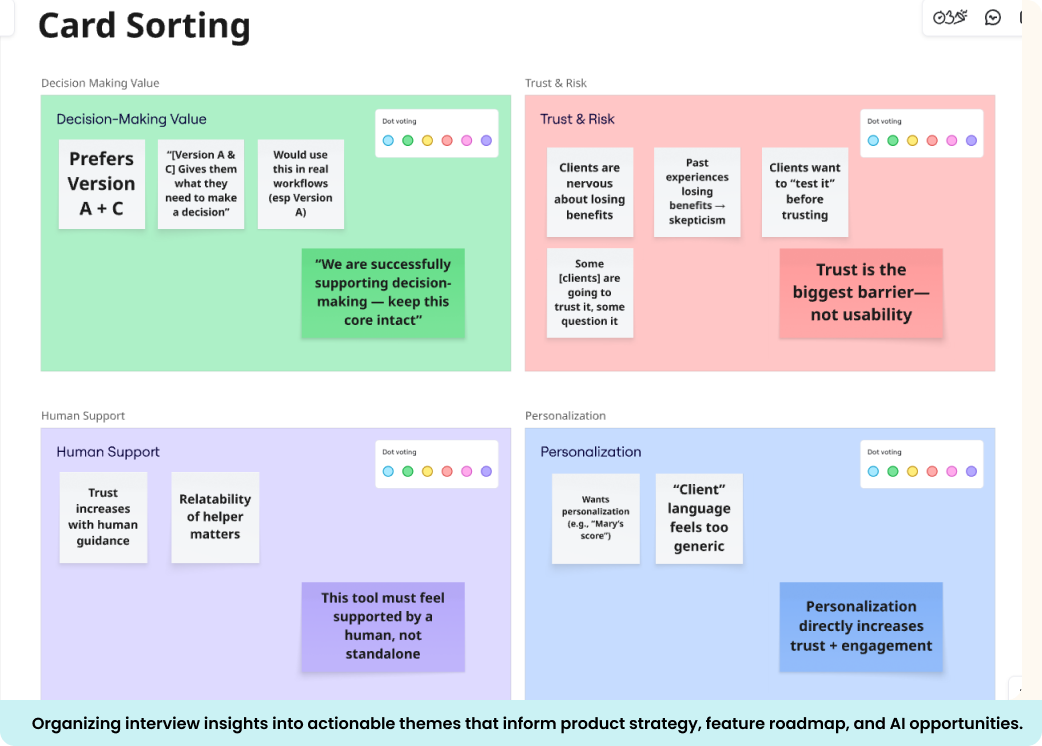
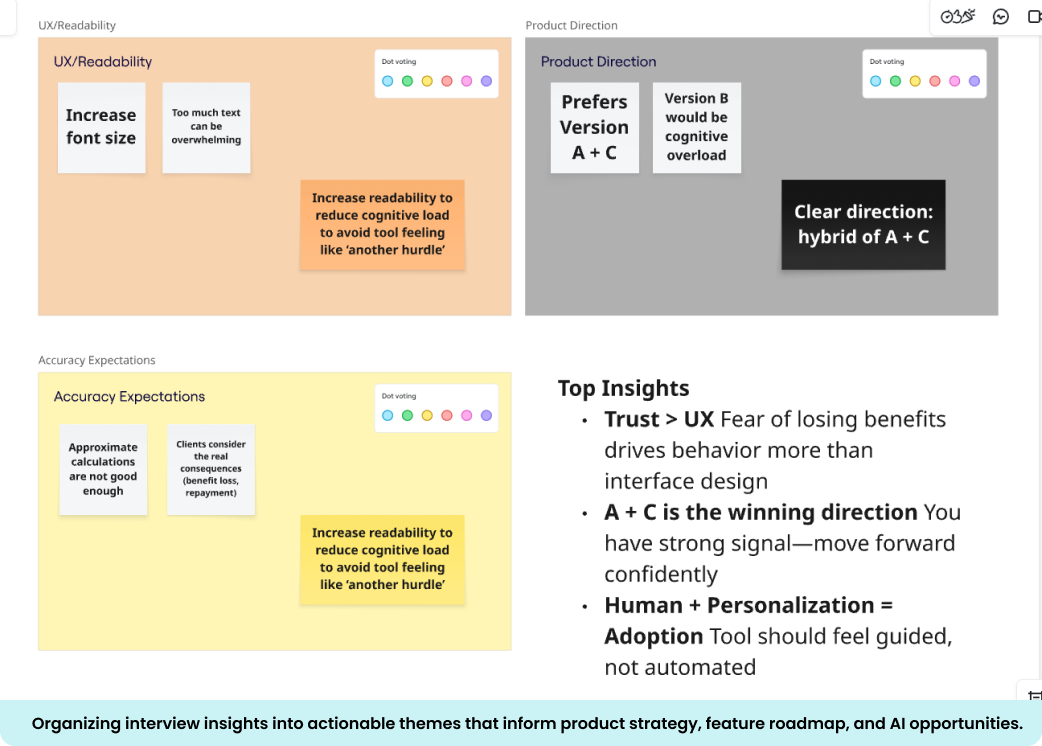
Because the experience relied on both policy calculations and AI-generated guidance, usability testing focused on more than navigation—it focused on trust.
I conducted testing sessions with program staff and older adult clients to evaluate how users interpreted employment scenarios, understood AI-generated explanations, and used recommendations to make decisions. Staff provided feedback on workflow efficiency and recommendation accuracy, while clients helped validate whether the guidance felt clear, understandable, and trustworthy.
The findings led to refinements in terminology, financial visualizations, AI messaging, and interaction patterns, resulting in a more transparent and confidence-building experience for both audiences.
I conducted testing sessions with program staff and older adult clients to evaluate how users interpreted employment scenarios, understood AI-generated explanations, and used recommendations to make decisions. Staff provided feedback on workflow efficiency and recommendation accuracy, while clients helped validate whether the guidance felt clear, understandable, and trustworthy.
The findings led to refinements in terminology, financial visualizations, AI messaging, and interaction patterns, resulting in a more transparent and confidence-building experience for both audiences.
04
THE OUTCOMES
The Benefit Cliff Tool expanded BestFit beyond eligibility screening into proactive financial decision support. It established a foundation for helping workforce organizations, higher education institutions, and nonprofits guide clients through employment transitions with greater confidence.
5+
public benefit programs modeled together
1
unified experience replacing manual spreadsheets and policy references
Better Decisions
Users can evaluate employment opportunities before making life-changing choices.
Greater Confidence
Plain-language explanations and clear data visualizations help people understand complex policy interactions.
Faster Case Management
Scenario comparisons reduce manual calculations for staff.
EXPLORE MORE
← BACK TO PORTFOLIO